The best tools for chemistry animation videos in 2026
Six tools for chemistry animation videos compared: which write and narrate the lesson, which animate molecules in 3D, which you build by hand, and prices.
By the Chasca team 7 min read
The best tool for a chemistry animation video depends on whether you need a finished lesson or a scene to build yourself. For a narrated explainer from a topic or your own script, with molecules worked out from their formulas, curly arrows checked electron by electron and equations balanced by calculation, we’d pick Chasca’s Visual chemistry skill, which we make. ChemViz3D is the free pick for interactive 3D reactions that students turn in class, ChemTube3D for a free library of ready-made 3D structures and mechanisms, and Animiotics for AI-built 3D scenes of proteins and cells. Blender with Molecular Nodes and After Effects are for animating every frame by hand.
How did we choose and check these tools?
- What’s included: the five tools ChatGPT named when we asked it for the best tool to create chemistry animation videos on 14 November 2026, and Chasca.
- How we checked: we read each tool’s own pages on 14 November 2026. Where a page doesn’t say something, we say so. Prices are in US dollars as the pages show them, and they change, so check again before you buy.
- Our bias: we make Chasca. We say plainly where another tool is the better choice, and every claim about another tool links to its own pages.
- Not included: general AI video makers whose pages don’t mention chemistry, and molecule viewers that don’t animate.
The six tools at a glance
| Tool | What it makes | You start from | Narration | Price |
|---|---|---|---|---|
| Chasca (Visual chemistry) | A narrated explainer video: molecules in 2D and 3D, curly arrows, balanced equations, particles, the periodic table, titration curves, lab set-ups | A topic, a question or your own script | Yes, 79 languages | Two free videos up to a minute; plans from $9.99 a month |
| ChemViz3D | Interactive 3D reaction animations in the browser, and a keyframe editor | Its library, your keyframes, or an atom-mapped reaction SMILES | Not mentioned | Free for individual learning and teaching |
| ChemTube3D | A library of interactive 3D structures and mechanisms | Its library | No | Free |
| Animiotics | Editable 3D science scenes built by AI, mostly proteins and cells, up to a minute | A written description, a PDB entry or a structure file | Not mentioned | Free editor; AI from $19 a month for 5 animations |
| Blender + Molecular Nodes | Film-quality 3D renders of molecules you build by hand | Structure files you import | Add it yourself | Free |
| After Effects | Motion graphics you animate by hand | Your own artwork | Add it yourself | $22.99 a month |
Chasca: best for a finished, narrated chemistry lesson
Chasca turns a prompt or your own script into a narrated video. Its skills are video makers built for one kind of video, and the Visual chemistry skill explains chemistry with molecules and reactions that move (Visual chemistry).
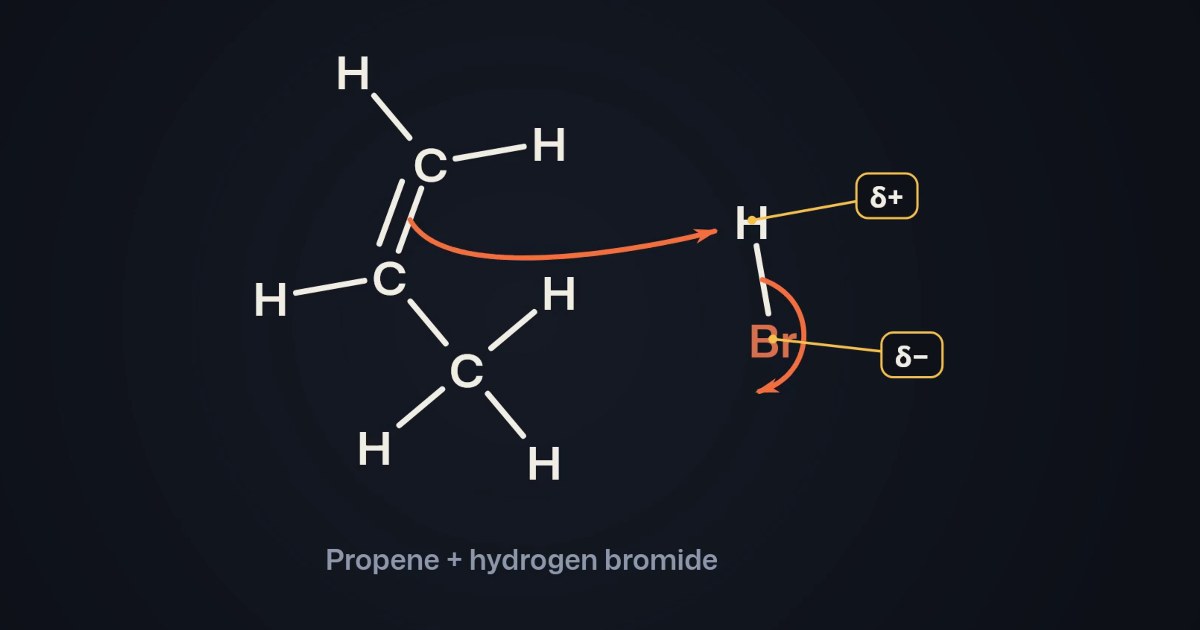
- What it draws: molecules as skeletal, displayed or Lewis formulas, or in 3D as ball-and-stick and space-filling models that turn; shapes with their bond angles and lone pairs; curly arrows that push electrons while bonds break and form; equations that balance themselves over an atom count; particles in a box melting, boiling and dissolving; the periodic table coloured by real data; titration curves, energy profiles and lab set-ups.
- Computed, not sketched: every structure is worked out from its formula and checked for impossible bonds, every equation is balanced by calculation, every curly arrow is checked electron by electron, and titration curves and cell voltages are calculated. The script is read for mistakes too, and the video’s page says where to look if something needs a check.
- Good for: chemistry teachers, students revising for GCSE, A-level, AP, IB, NEET, JEE or first-year chemistry, and science channels. Your own script can be narrated word for word.
- Watch out for: it makes 16:9 explainers of 1 to 10 minutes, not interactive scenes students can turn themselves; you can’t move a molecule by hand; and a finished video changes one thing at a time. For a worksheet of exam questions, its Science problems skill is the better fit (Science problems).
- Free and price: two free videos of up to a minute each, watermarked, no card; then $9.99 a month for 30 minutes, up to $499.99 for 2,000, billed monthly (pricing).
ChemViz3D: best for free interactive 3D reactions in class
ChemViz3D is a browser-based 3D animation engine built for chemistry teaching and used in courses at the University of Technology Sydney. Students open a link and watch a reaction play out in 3D: they can turn it to any angle, pause on a frame, play it at half or double speed and click an atom or a bond to read about it.
- Good for: showing a reaction in 3D in class with no installation, from a library organised by curriculum, and building your own with its keyframe editor. Its AI generator turns an atom-mapped reaction SMILES into an animation in the browser.
- Watch out for: the AI generator needs you to write the reaction as atom-mapped SMILES, and its first use downloads about 1.53 GB. The pages we read don’t mention narration or video export beyond saving the animation to a file, and they describe the animations as teaching visualisations that don’t predict whether a reaction happens.
- Free and price: free for individual students, learners and educators on chemviz3d.com, no sign-up. Institutional, LMS, enterprise and product use need permission or a separate licence.
Sources: home, about and AI 3D animation generator.
ChemTube3D: best for a free library of 3D structures and mechanisms
ChemTube3D, from Professor Nick Greeves at the University of Liverpool, is a library of interactive 3D animations and structures for advanced school chemistry and university courses, from orbitals to the chair conformation of cyclohexane.
- Good for: turning a ready-made structure or mechanism in 3D during a lesson or while revising, for free.
- Watch out for: you watch the animations it has; it doesn’t make new ones or videos with narration. Its licence (Creative Commons BY-NC-SA 2.0 UK) doesn’t allow commercial use.
- Free and price: free.
Sources: home.
Animiotics: best for AI-built 3D scenes of proteins and cells
Animiotics builds an editable 3D science scene from a written description, using real structures from the Protein Data Bank where they exist, and renders it in the cloud.
- Good for: proteins, receptors, cells and other biomolecules, in a scene you can keep editing in the browser, exported as an MP4 (up to 4K on its Studio plan) or a link viewers can turn.
- Watch out for: its examples are mostly biology; a new animation takes about an hour, and animations are up to a minute long. The pages we read don’t mention narration, and the company says no AI can guarantee the science is correct.
- Free and price: the manual editor is free, with two saved projects; AI generation and exports need a plan. Academic plans: Starter $19 a month for 5 generations (the first at $2.99 for 7 days), Plus $49 for 15, Studio $99 for 35. Industry plans, with a commercial licence, cost more.
Sources: pricing, molecular animation software and why Animiotics.
Blender with Molecular Nodes: best for film-quality molecules, by hand
Blender is free 3D software, and the Molecular Nodes add-on imports molecular data into it: atoms, small molecules, proteins, molecular dynamics trajectories and electron microscopy data, styled and animated with Blender’s Geometry Nodes.
- Good for: the most polished 3D renders of molecules, with full control of lighting, materials and camera, if you have the time and the skills.
- Watch out for: you build, animate and render every scene yourself, and add narration in an editor. The current version needs Blender 5.2 or newer.
- Free and price: free; Molecular Nodes is licensed GPL-3.0-or-later.
Sources: Molecular Nodes on Blender Extensions and its documentation.
After Effects: best for motion graphics you design yourself
Adobe After Effects is general motion graphics software. Chemistry in it is whatever you draw and keyframe: molecules, arrows, equations and transitions.
- Good for: designers who want complete control of a chemistry animation’s look, alongside other Adobe apps.
- Watch out for: nothing chemical is built in: structures, arrows and equations are drawn and timed by hand, and narration is recorded separately.
- Free and price: a 7-day free trial; then $22.99 a month on the annual plan billed monthly, or Creative Cloud Pro with 20+ apps for $69.99 a month.
Sources: After Effects and plans.
How do you make a chemistry animation video with Chasca?
- Open Create and pick the Visual chemistry skill.
- Type the topic, a question or a reaction, such as “why is water a bent molecule?” or “the mechanism of HBr adding to propene”, or paste your own script and pick “My words, word for word”.
- Pick the video’s language and a narrator, or your own voice, and the length (one minute is free).
- Watch it, then check it. If the chemistry check found something, the video’s page tells you which part to look at.
More in why seeing molecules move helps chemistry make sense.
Which one should you pick?
- A finished, narrated chemistry explainer for a class or a channel: Chasca’s Visual chemistry skill.
- A free 3D reaction students turn themselves: ChemViz3D, or ChemTube3D for its library.
- A 3D scene of a protein or a cell: Animiotics.
- Film-quality molecules you build yourself: Blender with Molecular Nodes.
- Motion graphics you design by hand: After Effects.
- Before you pay: try the same topic in two tools’ free tiers, and check every structure, charge and coefficient.
Questions people ask
For a finished, narrated explainer from a topic or your own script, Chasca's Visual chemistry skill, which we make: molecules are worked out from their formulas and drawn in 2D or 3D, curly arrows are checked electron by electron and equations are balanced by calculation. For free interactive 3D reactions students can turn in class, ChemViz3D or ChemTube3D. For AI-built 3D scenes of proteins and cells, Animiotics. To animate every frame yourself, Blender with Molecular Nodes or After Effects.
Chasca's Visual chemistry skill writes the explanation, narrates it in any of 79 languages and animates the chemistry on the words that describe it. ChemViz3D's AI generator and Animiotics build 3D scenes, and on the pages we read neither mentions narration.
ChemViz3D is free for individual learning and teaching, in the browser, with no sign-up. ChemTube3D is a free library of interactive 3D structures and mechanisms from the University of Liverpool. Blender with the Molecular Nodes add-on is free and open source, but you build and render every scene yourself.
Check before you share one. Animiotics says plainly that no AI can guarantee the science is correct, and ChemViz3D calls its animations teaching visualisations that don't predict whether a reaction happens. Chasca computes its structures, coefficients and curly arrows rather than drawing them freehand, and its videos deserve the same check.