The best tools for system design explainer videos in 2026
Six tools for system design videos, compared from their own pages: what each one makes, whether it narrates, how much you do by hand, and what it costs.
By the Chasca team 7 min read
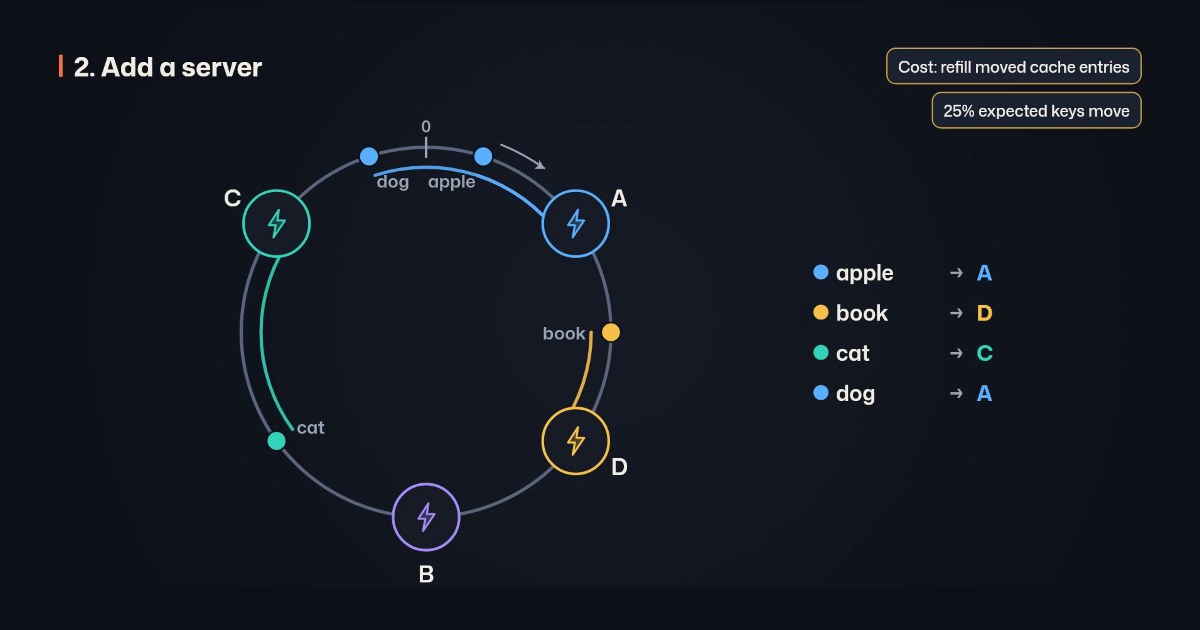
For a finished, narrated system design video from a prompt, we’d pick Chasca’s System design skill, which we make: it writes the script, builds the architecture diagram as the narration names each part, and moves requests along the arrows with their numbers on them. Systemap is the pick for animating a diagram you draw yourself, Manim for animating from code, Excalidraw or Eraser for clean still diagrams, and After Effects for full control, frame by frame.
How did we choose and check these tools?
- What’s included: the five tools ChatGPT named when we asked it for the best tool to create system design explainer videos (Systemap, Manim, Excalidraw, After Effects and Eraser), and Chasca.
- How we checked: we read each tool’s own pages between 9 and 14 November 2026. Prices are US list prices as shown. Where a page doesn’t say something, we say so, and where a tool’s pages disagree, we say that too. Prices and limits change, so check again before you buy.
- Our bias: we make Chasca. We say plainly where another tool is the better choice, and every claim about another tool links to its own pages.
- Not included: general AI video makers whose pages don’t mention system design or architecture diagrams.
The six tools at a glance
| Tool | What it makes | Narration | How it’s made | Free | Paid from |
|---|---|---|---|---|---|
| Chasca | A narrated 16:9 video around an animated architecture diagram | Written and voiced, 79 languages | From a prompt or your script | Two videos of up to a minute, watermarked | $9.99 a month (30 minutes) |
| Systemap | Animated diagrams, exported as MP4, PowerPoint or PNG | None | You draw and time it; an AI draft on your own key | 720p video with a watermark | “From $9/mo” |
| Manim | Animations rendered from Python code | Through a plugin, from text you write | Code | Free and open source | Free |
| Excalidraw | Hand-drawn style diagrams, PNG and SVG | None | By hand, or text to diagram | One scene, 10 AI requests a day | $6 a user a month, billed yearly |
| After Effects | Any video, keyframed by hand | A recording you import | By hand | 7-day trial | US$22.99 a month on an annual plan |
| Eraser | Diagrams from a prompt or code; PNG, SVG, PDF and slides | None | A prompt, then edits | 3 files, 3 AI credits | $45 a member a month billed yearly, $60 monthly |
Chasca: best for a finished, narrated video from a prompt
Chasca turns a prompt, your own script or a document into a narrated video. Its skills are video makers built for one kind of video each, and its System design skill explains software architecture with an animated diagram.
- How it works: type a system (“how does a URL shortener handle a billion clicks?”) or a question (“which keys move when a server joins a hash ring?”), or paste your own script. Clients, load balancers, services, caches, databases and queues appear as the narration names them, laid out the way requests travel; requests move along the arrows with latency and throughput on them; the system scales, fails and recovers (System design).
- Worked out, not drawn by eye: round robin skips a server that is down, a token bucket refuses requests it has no tokens for, a queue counts what waits in it, and a hash ring gives each key to the next server clockwise. Sequence diagrams show a protocol message by message.
- Also: 79 languages, each spoken by all 30 narrators, with the diagram laid out right to left in Arabic; your own voice on every plan (custom voices); the script checked for factual mistakes before the video is made.
- Watch out for: the skill makes 16:9 videos of 1 to 10 minutes; you can’t move a box by hand, and it doesn’t read a picture of your diagram. Products appear only as names, never as vendor logos.
- Price: two free videos of up to a minute each, watermarked, no card; then $9.99 a month for 30 minutes, up to $499.99 for 2,000, billed monthly (pricing).
Systemap: best for animating a diagram you draw yourself
Systemap is a browser editor for animated system design diagrams: packets travel along the lines, components change state, and the pages play in order as one video. Two products share the name; this is systemap.app, the one that makes video.
- Good for: MP4 in 16:9 or 9:16, and PowerPoint, from one drawing; 30 system design templates on the paid plan, including sharding, read replicas, caching, rate limiters, load balancing and queues; trying it without signing up.
- Watch out for: it makes no voice, so narration is recorded and added in another editor; animation timing is set by hand on a timeline; its AI draft runs on your own Claude or OpenAI key. Paid videos stop at 3 minutes.
- Free and price: the whole editor, PNG export and 720p video with a watermark are free. Creator is “from $9/mo”, for 1080p without the watermark, PowerPoint export and the templates; no yearly price is shown.
Sources: home, animating a system design diagram, diagram to video and PowerPoint and templates.
Manim: best for exact animation from code
Manim, in its community edition, is a free, open-source Python library for mathematical animation that can draw architecture diagrams too.
- Good for: exact control of every shape and every timing; MP4, GIF, WebM or MOV at up to 2160p60; narration through the manim-voiceover plugin, which times animations to the words of a text you write, spoken by a text-to-speech service or recorded with your microphone.
- Watch out for: every box, arrow and timing is code. Several versions of Manim exist, and a tutorial for one won’t always work with another. A voice needs the plugin and a speech service or a microphone.
- Free and price: free, under the MIT licence.
Sources: Manim Community, configuration, quickstart and manim-voiceover.
Excalidraw: best for hand-drawn diagrams you present yourself
Excalidraw is an open-source whiteboard with a hand-drawn look, often used for system design sketches and interviews.
- Good for: quick diagrams with no account; text to diagram and Mermaid import in the free editor; presentations built from frames on Excalidraw+.
- Watch out for: its pages don’t mention video, recording or narration, so a video means recording your screen while you talk, then editing it. The free editor has one scene and 10 AI requests a day.
- Free and price: free forever with one scene. Excalidraw+ is $6 a user a month billed yearly, with a 14-day trial; its monthly price didn’t show on the pricing page when we checked.
Sources: pricing and Excalidraw+.
After Effects: best for full control, frame by frame
Adobe After Effects is desktop motion graphics software: any diagram can be animated exactly as you want, and its Render Queue exports H.264 MP4.
- Good for: no limits on style, motion or length; working with Premiere Pro and Media Encoder.
- Watch out for: every box, arrow and request is keyframed by hand, and the narration is a recording you import and time the animation to, which makes it the slowest route per minute of video. The headline price is for an annual plan.
- Free and price: a 7-day trial; the single app is US$22.99 a month on an annual plan, billed monthly.
Sources: plans, After Effects and exporting H.264.
Eraser: best for clean architecture diagrams from text or code
Eraser turns a prompt, code, a file or a repository into an editable diagram, with cloud architecture, sequence and entity diagrams and more than 3,000 tech icons.
- Good for: fast, tidy architecture and sequence diagrams from text, edited as code or by prompting again; export to PNG, SVG, PDF, PowerPoint and Google Slides; a Present mode that plays a flow step by step.
- Watch out for: its pages don’t mention video or narration. The free plan is small, and its pricing page and its documentation disagree on which exports it includes.
- Free and price: free for 3 files and 3 AI credits. Business is $45 a member a month billed yearly, or $60 monthly, with 100 AI credits a month.
Sources: pricing, AI diagrams, export and presenting.
How do you make a system design video with Chasca?
- Sign up and pick the System design skill under Skills.
- Type the system or the question, for example “Design a rate limiter with a token bucket. Show a burst of requests and which ones get a 429.” Or choose “My words, word for word” and paste your script.
- Choose the look (Dark or Light), the length, the language and a narrator, or your own voice.
- Create it. The video comes back narrated, with the diagram built as it’s explained; if the script needs a check, the video’s page says where.
Which one should you pick?
- You want the finished video, narrated, from a sentence: Chasca’s System design skill.
- You want to draw and time the diagram yourself, then add your own voice: Systemap.
- You code and want exact control: Manim.
- You want a still diagram for a doc or a slide: Eraser or Excalidraw.
- You’re a motion designer with time to keyframe: After Effects.
Questions people ask
For a finished, narrated video from a prompt, Chasca's System design skill, which we make: it writes the script, builds an animated architecture diagram as the narration names each part, and moves requests along the arrows. Systemap animates diagrams you draw and exports video without a voice, Manim animates from code, Excalidraw and Eraser draw still diagrams, and After Effects animates anything by hand.
Yes. Systemap animates diagrams in the browser, with packets and steps you place and time yourself, and Chasca's System design skill makes the whole narrated video from a prompt. Manim needs Python code.
Chasca writes and voices the narration itself, in 79 languages. Manim can add narration through its manim-voiceover plugin, from text you write, and After Effects times the animation to a recording you import. Systemap, Excalidraw and Eraser make no voice.
Manim is free and open source, but you write the animation in Python. Systemap's free plan exports 720p video with a watermark, Excalidraw's free editor draws still diagrams, and Chasca's first two videos are free, up to a minute each, watermarked.