The best tools to create biology animation videos in 2026
Nine tools for biology animation compared: narrated lessons, 3D molecules, static figures and interactive anatomy, with what each makes, languages and price.
By the Chasca team 9 min read
The best tool to create biology animation videos depends on what you need to show and who will watch. For a narrated lesson on a process from the syllabus, with labelled diagrams that move in step with the explanation, in your students’ language, we’d pick Chasca’s Visual biology skill, which we make. For 3D molecular and cell scenes, Animiotics generates them from a description, a minute at a time. BioRender is the standard for accurate static figures but doesn’t animate. BioDigital Human and Complete Anatomy are interactive 3D anatomy apps rather than video makers, Vyond and Animaker make general animated videos, and Blender and After Effects animate anything you build by hand.
How did we choose and check these tools?
- What’s included: the tools AI assistants name when asked for the best tool to create biology animation videos or medical animations for patient education, plus Chasca.
- How we checked: we read each tool’s own product, pricing, help and terms pages on 14 November 2026. A few sites refused automated reading that day, so we used copies of the same pages saved in the days before. “Not found” means those pages didn’t mention a feature, which doesn’t prove it’s missing; where a tool’s own pages disagree, we say so. Prices are US list prices and change often, so check before you buy.
- Our bias: we make Chasca. We say plainly where another tool is the better choice, and every claim about another tool links to its own pages.
- Not included: medical animation studios that make films to order, and libraries of ready-made videos.
The nine tools at a glance
| Tool | What it makes | A narrated video from a topic | Biology content | Free | Paid from |
|---|---|---|---|---|---|
| Chasca | Narrated lessons with labelled 2D diagrams that move | Yes, in 79 languages | Cells, DNA, cell division, enzymes, the heart, lungs, nerves, the gut, immunity, genetics, evolution, food webs | 2 videos up to 1 minute, watermarked | $9.99 a month (30 minutes) |
| Animiotics | 3D science scenes up to 60 seconds each | Yes, a scene at a time; voiceover in English only | Protein Data Bank structures | Manual editor only, no exports | $19 a month, or $15 billed yearly |
| BioRender | Static figures, posters and slides | No (it doesn’t animate) | 50,000+ icons and templates | 3 figures, watermarked | $35 a month billed yearly ($39 monthly) |
| Animaker | Animated and generated videos | Partly (90 seconds a month of generated video on Starter) | None stated | Watermarked | $45 a month, or $25 billed yearly |
| Vyond | Business-style animated videos | Yes, about 2 minutes | None stated | A trial, watermarked, no downloads | $99 a month, or $58 billed yearly |
| Blender | 3D animation you build by hand | No | None | Free and open source | Free |
| After Effects | Motion graphics you build by hand | No | None | 7-day trial | $22.99 a month (annual plan) |
| BioDigital Human | Interactive 3D anatomy models and tours | No | 1,000+ 3D models | Anatomy only, 10 views a month | Contact sales |
| Complete Anatomy | An interactive 3D anatomy app | No | 20+ microanatomy models | 3-day trial | $39.99 the first year (students) |
Chasca: best for narrated lessons on syllabus processes, in any language
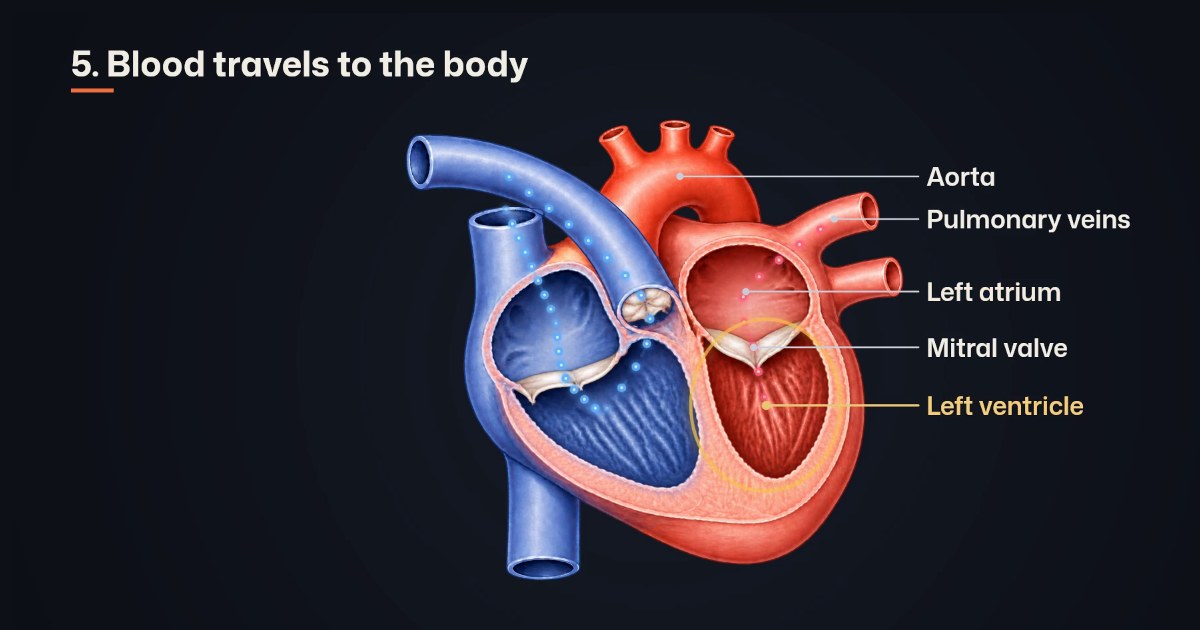
Chasca’s Visual biology skill turns a process, a question or your own script into a narrated video with clear, labelled diagrams that move: chromosomes lining up and pulling apart in mitosis and meiosis, DNA copied and read into a protein, blood flowing through the four chambers of the heart, an enzyme splitting its substrate, a Punnett square filling in cell by cell, energy moving through a food web, a population of moths changing over generations.
- Good for: teachers, students and science channels who need the processes of GCSE, A-level, AP, IB and NEET biology explained step by step. Each part is labelled on the word that names it, with the syllabus name for it; the camera zooms into what is being explained; and Punnett ratios and graphs are computed exactly. Narration and labels come in any of 79 languages, by any of 30 narrators or in your own voice (custom voices).
- Watch out for: it draws clear 2D textbook diagrams, not photographs, microscope images or 3D anatomy, and it explains health topics like a patient leaflet, without giving medical advice. Videos run from 1 to 10 minutes. Check every label and step before you share a video.
- Free and price: two free videos up to a minute each, watermarked, with no card; then $9.99 a month for 30 minutes, billed monthly (pricing).
Animiotics: best for 3D molecular and cell scenes from a description
Animiotics generates a 3D scientific scene from a written description of up to 3,000 characters, building it from real Protein Data Bank structures, and renders it as a film of up to 60 seconds. It takes about an hour, and a free manual editor lets you change the scene yourself.
- Good for: molecular mechanisms in 3D, such as a receptor and its drug, for research talks and teaching, with an optional AI voiceover and captions once the film is made.
- Watch out for: each animation is capped at 60 seconds, so a longer film is cut from several; the voiceover is English only, with one female and one male voice. One generation is one new animation or one AI edit. Academic plans cover research, teaching and academic publishing; the commercial licence starts on Industry plans at $149 a seat a month. Its own pages warn that AI can get the science wrong.
- Free and price: the free plan is the manual editor with no AI generation and no exports. Academic Starter is $19 a month, or $15 billed yearly, for five generations a month at 1080p.
Sources: pricing, docs and the AI generator.
BioRender: best for accurate static figures
BioRender is where scientists draw figures for papers, posters and slides, from 50,000+ icons and templates across 30+ life-science fields, with an AI figure builder.
- Good for: graphical abstracts, posters and slide figures that look professional and stay accurate.
- Watch out for: it makes static figures. Its help centre says it doesn’t offer animation and suggests making a GIF from exported frames, and there’s no narration. Monetised YouTube or social channels and marketing need an Industry licence, and every published use must carry “Created with BioRender.com” or the figure’s citation.
- Free and price: the free plan makes up to three figures, watermarked, with no publishing. Academic is $35 a month billed yearly, or $39 monthly; Industry is $95 a month billed yearly, or $115 monthly.
Animaker: generated and animated videos, with no biology library
Animaker makes animated, whiteboard and generated videos in a drag-and-drop editor, with an AI video generator, an AI script generator and 1,800+ voices.
- Good for: general animated explainers that you assemble from its characters and templates.
- Watch out for: we found no science or biology templates. Generated video is metered at 90 seconds a month on Starter, 180 on Pro and 320 on Max. Commercial rights first appear on the Pro card, and its pricing page shows several different prices.
- Free and price: free exports are watermarked. Starter is $45 a month, or $25 a month billed yearly.
Sources: pricing and the AI video generator.
Vyond: business-style animated videos from a prompt
Vyond Go turns a prompt, a script, a document or a web page into a script and an animated video of about two minutes, with text-to-speech from 650+ voices, in character, whiteboard and infographic styles.
- Good for: training and business explainers with cartoon characters.
- Watch out for: no biology content is listed, and its help centre asks you to review the script it writes. Trials carry no commercial licence, and making videos for clients needs the Agency plan, $167 a month billed yearly.
- Free and price: a trial with a watermark and no downloads. Starter is $99 a month, or $58 a month billed yearly.
Blender: best for 3D animation you build yourself, free
Blender is a free, open-source 3D suite for modelling, animation, simulation, rendering and video editing.
- Good for: full control over a 3D biology film, if you have the time and the skill; everything you make is yours.
- Watch out for: it’s a hand tool, with no AI, narration or biology content: the models, labels, accuracy and voice are all your own work.
- Free and price: free.
Sources: features and licence.
After Effects: motion graphics for designers
Adobe After Effects makes motion graphics, visual effects and 2D and 3D animation, with AI helpers such as object masking and content-aware fill.
- Good for: a designer animating a polished biology sequence by hand.
- Watch out for: there are no biology assets, narration or scripts: every diagram and every voice is made by hand. Trials turn into paid plans unless you cancel.
- Free and price: a 7-day trial; $22.99 a month on an annual plan, billed monthly.
BioDigital Human: best for interactive 3D anatomy in a course or app
BioDigital Human is a library of 1,000+ interactive 3D models of anatomy, disease and treatment, with guided tours that can use text-to-speech or your own audio, for the web, apps and learning platforms.
- Good for: interactive anatomy inside a course, a patient portal or an app.
- Watch out for: it isn’t a video maker, and image and video publishing is a plan feature. Captured images and video must show the BioDigital logo, and commercial use needs a Business plan. Paid plans for individuals were retired on 1 May 2026.
- Free and price: the free plan covers anatomy and physiology only, 10 views a month; school and business plans are priced by sales.
Complete Anatomy: best for studying anatomy in 3D yourself
Complete Anatomy is an interactive 3D anatomy app, with a beating heart, muscle motion, virtual dissection, courses and a library of 1,500+ videos.
- Good for: students and professionals learning anatomy hands-on.
- Watch out for: the licence is personal and non-commercial. Publishing videos you make with it needs its written consent, and its terms assign the videos you make to its owner. We found no narration tool.
- Free and price: a 3-day trial; for students, $39.99 the first year, then $74.99 a year.
How do you make a biology animation video with AI?
With Chasca:
- Name the process, in the words your syllabus uses: for example, “how mitosis makes two identical cells” or “why a quarter of the puppies are white”.
- Open the Visual biology skill (“Visual biology” in the app) and paste it in, or paste your own script and choose “My words, word for word”.
- Pick the language your students learn in and a narrator, or your own voice.
- Choose the look: “Dark” for screens, or “Light” for projectors and print.
- Watch it once and check every label and step before you share it.
More in biology processes explained with moving diagrams.
Which one should you pick?
- A narrated lesson on a syllabus process, in your students’ language: Chasca.
- 3D molecular or cell scenes for a research talk: Animiotics.
- Accurate static figures for papers, posters and slides: BioRender.
- Interactive 3D anatomy for a course or app: BioDigital Human; for your own study: Complete Anatomy.
- General animated explainers: Vyond or Animaker.
- Full control, and time to learn: Blender (free) or After Effects.
- Whatever you use: check every label and step before you share, and read the licence before you publish.
Questions people ask
For a narrated lesson on a process from the syllabus, such as mitosis, protein synthesis, the heart or a Punnett cross, Chasca's Visual biology skill makes the whole video from a topic: labelled diagrams that move, in any of 79 languages. For 3D molecular scenes of up to 60 seconds, Animiotics generates them from a description. BioRender makes accurate static figures but doesn't animate them, and Blender or After Effects animate anything if you build it by hand.
Yes. Chasca's Visual biology skill shows the chromosomes condense, line up and pull apart, phase by phase, with every part labelled as it is named and the camera moving in to the part being explained. Animiotics generates a 3D scene of up to 60 seconds from a description, with an optional English voiceover. BioRender's help centre says it doesn't offer animation.
The licence. BioRender needs an Industry plan for monetised YouTube or marketing and a credit line on every published figure. BioDigital requires its logo on captures and a Business plan for commercial use. Complete Anatomy's licence is personal and non-commercial, and its terms assign the videos you make to its owner. Animiotics' commercial licence starts on its Industry plans. Read the terms of whichever tool you use.
Not always, so check every label, number and step before you share one. Animiotics warns that AI can get the science wrong and asks for a review before use. Chasca computes Punnett ratios and graphs exactly, checks each label against the picture before it is shown and checks the script for biology mistakes, but its videos deserve the same check.